Les professionnels de GBNews.ch s'allient à la puissance des technologies en intelligence artificielle générative, pour informer la communauté des affaires et le grand public, des dernières tendances et des évolutions du marché de l'emploi.

We like to think that playing a video at work is a solved problem. It’s 2026, right? We have self-driving cars and advanced AI, so surely we can drop a clip into a slide deck.
Except, we can’t. Not always.
The idea for my app, El Patator (originally drafted as Potatify), was born out of a spectacularly frustrating Tuesday right here at Geneva Business News. It exposed just how fragile corporate media tech actually is. It started with a classic setup: an intern needed to embed a short 4K smartphone video into a PowerPoint presentation for a remote meeting. It should have been a two-second drag-and-drop job. Instead, it triggered a technical domino effect.
First, the file blasted right past the company’s 30 MB email attachment limit. Naturally, they tried a cloud transfer service, which promptly got tangled up in corporate security restrictions.
Once the file was finally smuggled onto the right machine, roadblock number two appeared: PowerPoint flat-out refused to read the smartphone’s modern codec.
The final blow? The presentation was being edited and viewed through a Remote Desktop Protocol (RDP) session running without 3D acceleration. Trying to play a raw 4K video over that is like trying to force a highway’s worth of traffic through a straw. It stuttered, froze and died.
I stepped in with an emergency fix: a frantic, manual FFmpeg command-line conversion. I chopped the resolution, swapped the codec and compressed the file into something lightweight enough to survive the office infrastructure. It worked, but it required a computer science mindset for a task that any intern should be able to do blindfolded.
That’s when I realized: if this is happening to us, it’s happening to everyone. And since no one else was fixing it, I decided to build the solution myself.
I wanted to build a lightweight video tool engineered specifically for the quirks of office workflows and remote desktops. I wanted to take all the annoying, intimidating parts of video editing, such as bitrates, container formats and command-line arguments, and hide them behind a simple, friendly interface.
Because I wanted to move fast, I partnered with Claude Code as my digital co-pilot. Honestly, it cut my development time down to a quarter of what it would have taken me alone, allowing me to handle the heavy lifting of the coding without getting bogged down.
The workflow I designed is intentionally foolproof:
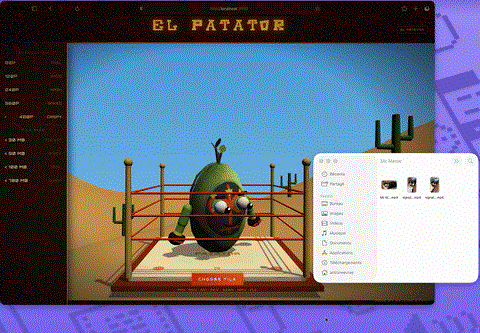
Drag your monster video file onto the potato.
Wait a few seconds while it does the heavy lifting.
Grab your freshly squished, presentation-ready video.
The app automatically spits out a file that is small enough to email, universally compatible with legacy office suites and optimized to play smoothly even in the laggiest virtual desktop environments.
Let’s be honest: traditional media converters look like the dashboard of a commercial airliner. They are terrifying for non-technical staff.
I decided to go in the exact opposite direction. El Patator uses a playful, animated potato character to handle the communication. When you drop a file onto the potato avatar, it physically grabs the file and does a little “conversion dance” while it processes it. Once it finishes, it celebrates by tossing a box of fries at you, containing a preview of your finished video. Your new file is downloaded automatically.
It turns a moment of tech rage into a literal smile while still getting the job done.
The inspiration actually comes from two tech subcultures:
The Camera Community: Enthusiasts often affectionately refer to low-quality or old cameras as “nuggets” or “potatoes.”
The PC Gaming Community: Gamers frequently lower their graphics settings to the absolute minimum to achieve smooth frame rates on older hardware, a setting known as “potato mode.”
They refer to this action as “potato-ing” the graphics. That is precisely what my app does, but for video playback.
Modern smartphones are mini movie cameras. They record at absurdly high bitrates and use advanced codecs by default. But while consumer tech has skyrocketed, corporate IT infrastructure is built for stability, security and standardization.
When 2026 smartphone footage collides with a restricted office network, legacy presentation software or non-accelerated virtual desktops, things break.
El Patator bridges that gap. It takes the phrase “the video isn’t working again” and turns it into a one-step fix that anyone in the office can handle. No tech degree required.
I’m still refining the app, and the user interface design for El Patator is going through some exciting changes as we speak, so expect a deeper dive into the visual design and frontend mechanics in a follow-up article soon!
Photo credit: Antoine Evray

Ingénieur logiciel spécialisé dans le cycle de vie complet des applications, de la conception à l'optimisation.