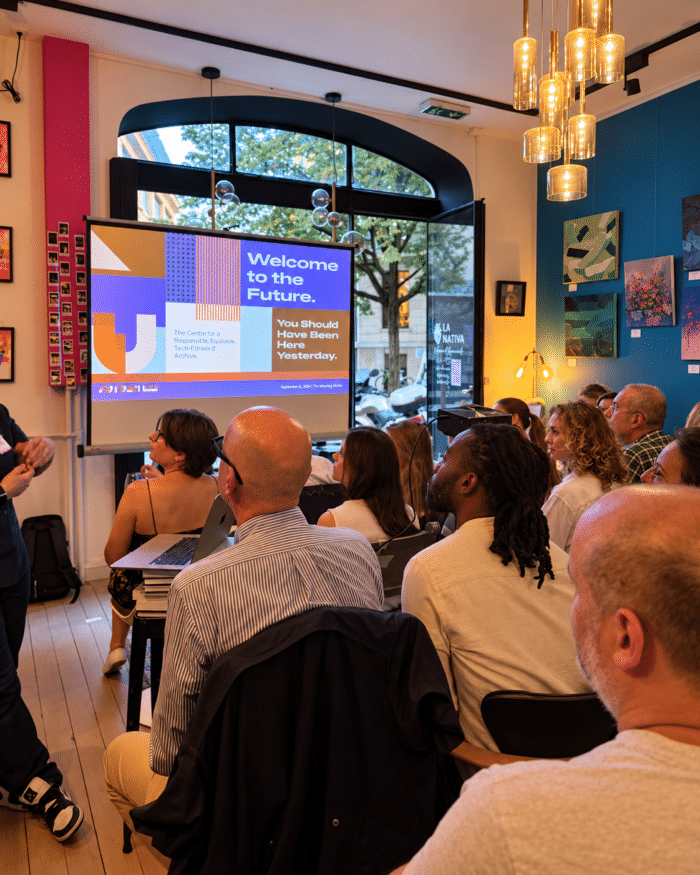
Stop Predicting the Future: What Geneva Marketers Learned About Strategic Foresight
At The Marketing Meetup Geneva, MC Casal explored how strategic foresight can help marketers prepare for several plausible... En lire plus

For a long time, I mainly used LinkedIn to present my professional experience. But over time, and especially as the platform has evolved, I realised that LinkedIn is much more than an online CV.
It is a professional showcase, a search tool and a place to build your reputation. It can also shape the first impression someone has of you before you even meet.
These are some topics that I explored during two sessions of my LinkedIn Personal Page Performance workshop for GBNews participants. We looked at how to improve a profile, work on professional positioning, use content more effectively and learn from the available data.
If you’re looking for a job, start with three questions: How might a recruiter perceive my profile? Is my professional positioning clear? What can someone find about me online?
Professional visibility isn’t only about what you say about yourself. It’s also about how easily the right person can find you and understand who you are.
Let’s look at three areas that can help: your profile, your content and your analytics.
Before you publish anything, start with your profile.
Imagine you’re a recruiter looking at it for the first time. Would you understand what kind of role they are suited for, what experience they bring and why their profile is relevant?
Your LinkedIn profile is more than a list of previous jobs. Think of it as a professional landing page that answers four questions:
Start with the essentials: your photo, banner, headline, About section, experience, skills, recommendations and Featured section. Each should help communicate your professional focus and support the impression you want to make.
Keywords matter, too. Look at job descriptions that interest you. Which skills, tools and responsibilities appear repeatedly? Where they accurately reflect your experience, incorporate them naturally into your profile. The goal isn’t to copy a job description, but to make the connection between your experience and your target roles clear.
It’s also worth checking how your profile appears in search. LinkedIn’s Search Appearances can provide information about how often your profile appeared in searches and, depending on the data available, which job titles or other details were associated with those searches. Some profile information may also appear in Google or Bing, depending on your public profile settings and search engine indexing.
These are useful signals, but they don’t tell the whole story. A profile appearing in search results doesn’t necessarily mean the right people are finding it.
Review your profile as if you were seeing it for the first time. Is your professional direction clear? Does the information support the impression you want to make? Are there outdated details or gaps to address?
You don’t need to change everything at once. Start with what matters most.
Your CV tells people about your experience. Your content gives them another way to understand how you think, what you know and which professional topics matter to you.
You don’t need to publish every day. Start with topics that connect your experience to the professional direction you want to develop.
Here are five useful content categories:
If you’re short of ideas, look at the questions people ask you, the problems you’ve solved and changes happening in your industry. LinkedIn’s Top Content feature can also help you explore popular topics. Use it for inspiration, not as a reason to copy other people’s posts.
Choose a format that suits your message. A short text post may be enough to share an observation; a carousel can explain a process step by step; an article may be better when a topic needs more depth.
Content isn’t limited to publishing posts. Thoughtful comments on relevant discussions can demonstrate your knowledge, while reposting content with your own perspective can contribute to meaningful professional conversations.
AI tools can help you organise ideas or improve your writing. But don’t publish AI-generated content without reviewing it and adding your own expertise. Your experience, examples and point of view are what make it relevant to you.
Before publishing, ask yourself: What do I want people to understand about my professional knowledge or interests after reading this?
Publishing content is only part of the process. The next step is to observe what happens and use that information to make better decisions.
Depending on the type of content and the analytics available to your account, LinkedIn may show metrics such as:
No single metric tells you whether a post was successful. A high number of impressions doesn’t automatically mean your content reached the people you want to reach. A post with fewer views may still lead to a useful conversation or a relevant profile visit.
If you’ve only published two or three posts, it’s too early to draw firm conclusions. You can, however, start looking for patterns:
Audience analytics, where available, can provide additional context about characteristics such as location, industry, job function or seniority. This can help you assess whether your content is reaching people who align with your professional goals.
The important part is to connect observations with actions. If a post has low impressions, review its topic, opening and format before assuming the subject is wrong. If it attracts comments or saves, consider what made it useful and whether you can develop the idea further.
You don’t need thousands of views to learn something useful. You need to look at the data in context and ask the right questions.
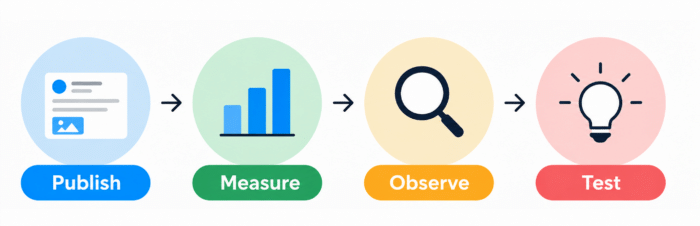
Your profile, content and analytics work best as connected parts of the same process.
For example, try a more specific opening for your next post, explain a concept through a concrete example or adjust your headline to make your expertise clearer.
Avoid changing everything at once. If you change several things simultaneously, it becomes harder to understand what may have influenced the outcome.
This process won’t guarantee a job offer or a particular level of visibility. It can, however, help you make more informed decisions about how you present yourself professionally and use LinkedIn.
LinkedIn is more than a place to upload your CV and wait for opportunities. Your profile, content and analytics can help you communicate your professional value and understand how others perceive it.
If you’re looking for a job, start by reviewing your profile from a recruiter’s perspective. What is clear? What is missing? And is the experience you want to highlight actually visible to someone who doesn’t know you?
These questions also led me to create Professional Market Readiness, a prompt that grew out of my own job search and helps you assess your CV and LinkedIn profile from an outside perspective, identify gaps and make your professional experience easier to understand.
You can try the prompt here: Professional Market Readiness — access the prompt.
The aim isn’t to be visible to everyone. It’s to make your professional positioning clearer and help the right people understand what you can bring.
🧾 LinkedIn Is Changing How It Evaluates Posts. The “Seems like AI slop” Button Is Only Part of a Bigger Change
🧾 Part Two - How AI Is Reshaping SEO: What Businesses Need to Know Now
🧾 Part One - How AI Is Reshaping SEO: What Businesses Need to Know Now
🧾 Pourquoi les campagnes Google Ads échouent en Suisse et comment les faire fonctionner
🧾 Why Google Ads Campaigns Fail in Switzerland - And What to Do About It
🧾 Réflexions sur l'atelier Google Ads : stratégie, structure, localisation
🧾 Google Ads Workshop Reflections: Strategy, Structure, Localization

I analyse projects, including contextual advertising audits. I identify weaknesses and highlight opportunities you may not even be aware off.